
If you searched for the Polymarket API or the Polymarket docs, here is the short answer: yes, Polymarket has a full, mostly public developer API, and this guide maps it so you can start reading markets or building in minutes. Polymarket exposes three REST services and a WebSocket feed, and most of it needs no key at all. Below is what each part does, how authentication works, the endpoints you will actually use, the official SDKs, and what you can build, with links to the official reference for exact parameters.
Not financial advice. This is a technical guide. Trading prediction markets involves real money and real risk of loss, and access is subject to Polymarket’s geographic restrictions. Comply with the law in your jurisdiction, verify everything against the official docs, and read our risk disclaimer first.
Key takeaways
- Polymarket has three REST APIs plus a WebSocket: Gamma (data), CLOB (trading), Data (analytics).
- Reading markets, prices and leaderboards is free and keyless on the Gamma and Data APIs.
- Trading runs through the CLOB API and is authenticated by signing with your Polygon wallet, not a classic API key.
- Official SDKs exist for Python (py-clob-client), TypeScript and Rust, and any HTTP client works for reads.
- The official reference at docs.polymarket.com is the source of truth for exact endpoints and limits.
The map: three APIs and a WebSocket
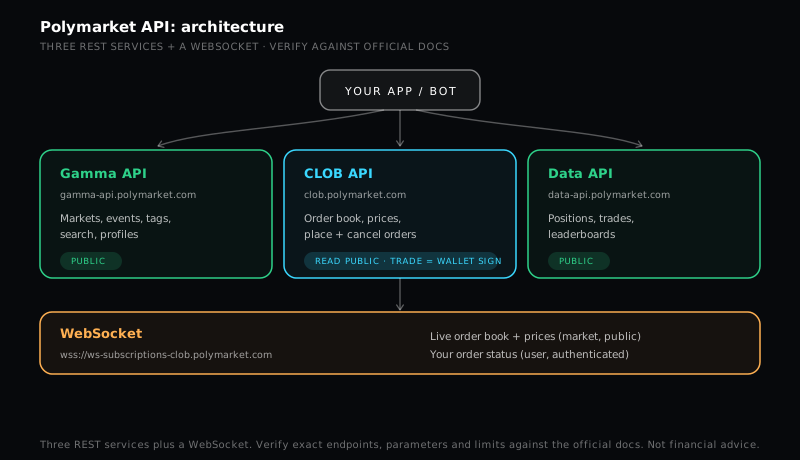
Polymarket splits its API by job, which keeps each piece simple. The table below is the mental model to keep.
| Service | Base URL | What it is for | Auth |
|---|---|---|---|
| Gamma API | gamma-api.polymarket.com | Markets, events, tags, series, search, public profiles | Public, no key |
| CLOB API | clob.polymarket.com | Order books, prices, midpoints, spreads, price history, order placement and cancellation | Public reads, wallet-signed trades |
| Data API | data-api.polymarket.com | Positions, trades, activity, holders, open interest, leaderboards | Public, no key |
| WebSocket | wss://ws-subscriptions-clob.polymarket.com | Live order-book and price updates, and your own order status | Public market channel, authenticated user channel |
Most applications read from Gamma and the Data API and never need to authenticate. You only reach for the authenticated side of CLOB when you actually want to place or cancel orders.
Gamma API: the market catalog
The Gamma API at gamma-api.polymarket.com is where you find what exists. The two endpoints you will use constantly are markets and events, where an event groups one or more related markets (a single question can have several outcome markets under it). Gamma also serves tags, series, sports, search and public profiles. It is fully public, so a simple GET request returns market metadata, current prices and the token IDs you need for everything else. If you are building a dashboard, a market screener, or a bot’s discovery layer, you start here.
CLOB API: the order book and trading
The CLOB API at clob.polymarket.com is the exchange. Its public side gives you the order book, prices, midpoints, spreads and price history for any market token. Its authenticated side is where trading happens: you build an order with a token ID, a price, a size and a side (buy or sell), sign it with your wallet, and post it, and you can cancel orders the same way.
Authentication here is the part that surprises people coming from traditional APIs. There is no key you paste from a dashboard. Instead you authenticate by signing messages with your Ethereum or Polygon wallet, which proves you control the funds without handing a secret to a server. The official SDKs handle this signing flow for you, which is the main reason to use them for trading rather than rolling your own.
Data API: positions, trades and leaderboards
The Data API at data-api.polymarket.com is the analytics layer. It exposes user positions, trades, activity, holder data, open interest, builder analytics and the public leaderboards. This is the API behind “who holds what” and “who is up the most” style features. It is fully public, which makes it ideal for research, copy-analysis dashboards, and anything that studies behavior rather than placing orders. If you wanted to study how the best traders are positioned, this is where that data lives.
WebSocket: live updates
Polling REST endpoints in a loop is fine for slow data, but for anything live you want the WebSocket at wss://ws-subscriptions-clob.polymarket.com. Subscribe to the market channel for public order-book and price updates, or to the user channel, which is authenticated, for your own order status in real time. Live dashboards, market-making bots and alerting systems all belong on the WebSocket, because it pushes changes to you instead of making you ask repeatedly.
Official SDKs and languages
You do not need an SDK to read data, a plain HTTP request works in any language, but for trading the official clients save real effort. Polymarket maintains a Python client (py-clob-client), plus TypeScript and Rust clients, and the community has added more. The SDKs handle wallet signing, order construction and the small details that are easy to get wrong by hand. For a read-only project, curl or fetch is enough; for a trading project, start from an official SDK.
What you can build
The API opens a few clear projects. A read-only market dashboard or screener pulls Gamma plus the Data API and needs no auth at all. A research tool that studies positioning and the leaderboards lives entirely on the Data API. A live odds widget or alert bot rides the WebSocket. And a trading bot uses an official SDK to sign and post orders through CLOB, ideally after a long paper-trading phase. For the manual side of the same markets, our guides on how to trade on Polymarket and Polymarket fees cover the mechanics, and how the UMA oracle resolves markets explains the settlement your code is ultimately betting on.
Practical notes and gotchas
A few things save time. Treat the public endpoints as rate limited: cache responses, back off on errors, and do not poll in a tight loop when the WebSocket exists. Token IDs, not market names, are the keys that tie Gamma, CLOB and the Data API together, so grab them early. Prices are probabilities between 0 and 1, not dollars, so size and risk math should respect that. And because trading is real on-chain money on Polygon, test with the smallest possible size, handle partial fills and failures, and never deploy a strategy you have not validated. Always confirm exact endpoint paths, parameters and limits against the official API reference, since those are the authoritative and current source.
Bottom line
The Polymarket API is more approachable than its reputation suggests: three REST services and a WebSocket, with the data side fully public and only trading gated behind wallet signing. Read with Gamma and the Data API, go live with the WebSocket, and trade through CLOB with an official SDK. Build read-only first, validate carefully, and respect the geographic restrictions and your local law before any real trading. New to the platform itself? Start with what Polymarket is and the best markets to watch, then come back to build.
This article is general technical information, not financial or legal advice. Trading prediction markets carries real risk of loss, APIs and endpoints change, and access is geographically restricted. Verify against the official docs, read our risk disclaimer, and never risk money you cannot afford to lose.
Frequently asked questions
Does Polymarket have a public API?
Yes. Polymarket exposes a full developer API split across three REST services, the Gamma API for market and event data, the CLOB API for the order book and trading, and the Data API for positions, trades and leaderboards, plus a WebSocket feed for live updates. The Gamma and Data APIs are fully public with no key required. The official reference lives at docs.polymarket.com, and you should treat that as the source of truth for exact parameters.
Is the Polymarket API free, and do I need an API key?
Reading data is free and mostly keyless. The Gamma API (gamma-api.polymarket.com) and the Data API (data-api.polymarket.com) are fully public, so you can pull markets, prices, positions and leaderboards without authentication. The CLOB API (clob.polymarket.com) is public for order-book and price reads, but placing or cancelling orders is authenticated. There is no classic API-key signup, you authenticate by signing with your wallet.
What is the difference between the Gamma, CLOB and Data APIs?
Gamma (gamma-api.polymarket.com) is the catalog: markets, events, tags, search and profiles. CLOB (clob.polymarket.com) is the exchange: order books, prices, midpoints, spreads, price history, and order placement or cancellation. The Data API (data-api.polymarket.com) is analytics: user positions, trades, activity, holders, open interest and leaderboards. Most apps read from Gamma and Data, and only touch CLOB's authenticated side to trade.
Can I place trades through the Polymarket API?
Yes, through the CLOB API's authenticated endpoints. You build an order with a token ID, price, size and side (buy or sell), sign it with your Polygon wallet, and post it. This is real money on-chain, so test with tiny size first, handle errors and partial fills, and never run a strategy you have not validated. Trading prediction markets carries real risk of loss. This is not financial advice.
Which languages and SDKs does Polymarket support?
Polymarket maintains an official Python client (py-clob-client) and TypeScript and Rust clients, and the community has built libraries in other languages. Because everything is REST and WebSocket over HTTP, you can also use plain curl, Go, or any language with an HTTP client. For trading specifically, the official SDKs are worth using because they handle the wallet signing and order formatting for you.
Is there a WebSocket for live Polymarket data?
Yes. Connect to the CLOB WebSocket at wss://ws-subscriptions-clob.polymarket.com and subscribe to the market channel for public order-book and price updates, or the user channel (authenticated) for your own order status. WebSockets are the right tool for live dashboards, trading bots and anything that needs sub-second updates, since polling the REST endpoints for the same data is slower and heavier.
Are there rate limits, and can I use the API from any country?
Treat the public endpoints as rate limited and cache aggressively, back off on errors, and check the official docs for current limits rather than hammering them. Access is also subject to Polymarket's geographic restrictions, which are documented and enforced, so the API is not a way around regional rules. Comply with the law in your jurisdiction. This article is general information, not legal or financial advice.
#Polymarket#API#CLOB#developers#prediction markets#guide
Discussion
Loading comments…