
BingX now has four separate AI products, and they do very different things. Two of them only talk to you. One prepares orders you confirm. One takes your money and trades a strategy on its own. Before you try any of them, it helps to know which is which.
We went through BingX’s announcements and help pages from September 2025 to March 2026 and sorted the tools by one question: who presses the buy button.
Not financial advice. AI tools can be wrong, signals fail, and automated strategies can lose money fast, especially with leverage. BingX itself states that its AI does not guarantee results. Do your own research.
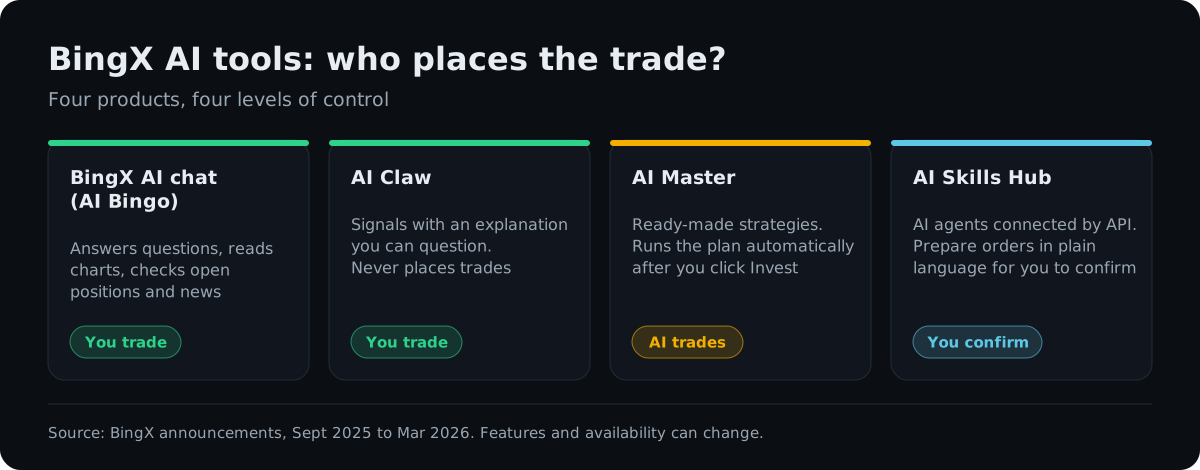
BingX AI chat (AI Bingo): the assistant
This is the one most users meet first. A BingX AI icon sits in the bottom-right corner of the website and the app (app version 4.59.0 or later), and it opens a chat. BingX describes several jobs for it:
- answering questions about tokens, strategies and market news
- news briefings with a sentiment reading
- trend forecasting that mixes technical indicators with sentiment
- smart position analysis, which looks at your open trades and comments on risk and timing
- AI trade review, which goes through your trade history and looks for repeating patterns
- a recommender that suggests copy traders based on their record and style
The last three are the useful part. Asking “what is the risk on my open ETH long?” or “what do my losing trades have in common?” is exactly the kind of question an AI answers well, because the answer comes from your own data. The trend forecasts deserve less trust. A forecast that mixes indicators and sentiment is still a guess, and our article on whether AI can predict crypto prices explains why such guesses rarely hold up.
AI Claw: signals you can question
BingX launched AI Claw on 20 March 2026 and calls it an AI trading analyst. It produces trading signals by checking technical indicators, capital flows, news and market sentiment against each other, and it adjusts as conditions change. Two design choices matter more than the marketing:
You can ask why. Every signal comes with reasoning you can question in the chat, so a signal never has to be a black box.
It does not trade. AI Claw gives signals and insights, and the decision to open a position stays with you.
BingX’s press release calls AI Claw a “world first” and says it learns from outcomes over time. Those are the company’s own claims, and BingX has not published a track record for the signals. If you use it, keep a simple log of signals you acted on and how they turned out. After a month you will know more about its value than any announcement can tell you.
AI Master: the one that trades for you
AI Master launched in September 2025 and works like copy trading with an AI layer. You browse “Masters”, each with strategies, a set of coins and a minimum investment. For each strategy you can see backtest results, returns of other followers, the supported coins and the leverage used. You can ask the AI Master in the chat about the strategy’s logic and risks. Then you press Invest Now, confirm the amount, and the plan runs automatically.
That last step is the important one. After you confirm, you are no longer approving each trade. Three things to check before you invest:
- Leverage. A strategy that looks smooth in a backtest can behave very differently with 10x leverage in a fast market. Our guide to leverage and liquidation shows the math.
- Backtest versus live results. A backtest shows how rules would have done on past data. Live returns of other followers are a better guide, and even those cover only a limited period.
- How you exit. BingX’s help page does not describe a stop mechanism for AI Master, so find out in the app how to pause or close a plan before you fund it.
Start with an amount you are fine losing and watch it for a few weeks. If you already use BingX copy trading, the same discipline applies here.
AI Skills Hub: AI agents with API access
The Skills Hub, launched on 10 March 2026, is aimed at a different user. It is a set of 15 skill modules that let AI agents work with your BingX account through the API, using plain-language requests. According to BingX, the modules cover:
- perpetual futures: market data, placing futures trades and managing related settings
- spot trading: watching markets, placing spot trades and managing assets
- account management: balances, transfers, sub-accounts, API keys and broker data
- multi-skill workflows that chain several of these together
BingX presents the Hub as part of a 300 million dollar commitment to build what it calls an AI-native exchange, and says users can confirm orders. In practice you connect an AI agent of your choice to your account, so security is your job:
- create a separate API key just for the agent
- never enable withdrawal permission
- restrict the key to known IP addresses if you can
- give only the permissions the task needs; an agent that only analyzes does not need trading rights
- check any agent software or “skill” you install comes from an official source
An agent with trading rights can make the same mistakes as an AI trading on its own. When AI models were given real money in a public test, most of them lost it, mostly by trading too often and too big. Our article on trading crypto with AI covers that experiment.
How we would use BingX AI
Use the tools from the top of the control scale down:
- Start with the AI chat. Ask it to check your open positions and review your past trades. It costs nothing and works on your own data.
- Add AI Claw signals to a watchlist, not straight to an order. Act only on the ones you understand after asking why.
- Try AI Master with a small amount, low leverage and a clear exit plan, the same way you would test a new copy trader.
- Leave the Skills Hub until you are comfortable with API keys and permissions.
Bottom line
BingX has put more AI into its app than most exchanges, and all of it is free to try. The chat and AI Claw are low-risk ways to get a second opinion while keeping control. AI Master hands control over, so treat it like copy trading with leverage. The Skills Hub is powerful for people who build or run AI agents, and risky for anyone who gives an agent more permissions than it needs.
If you want to try the tools, you can open a BingX account here. That is our referral link. For other exchange tools, see our guides to BingX trading bots and AI crypto portfolio trackers. This content is for information only and is not financial advice.
Frequently asked questions
Is BingX AI free?
Yes. BingX says its AI tools, including the BingX AI assistant (AI Bingo), AI Master and AI Claw, are free for registered users. You still pay normal trading fees on any trades you place, including trades AI Master places for you.
What is BingX AI Claw?
AI Claw is a signal tool BingX launched on 20 March 2026. It combines technical indicators, capital flows, news and sentiment into trading signals, explains each signal if you ask, and does not place trades by itself. Treat its signals as ideas to check, not as instructions.
Does BingX AI Master trade automatically?
Yes. You pick a Master and a strategy, review its backtest and leverage, then press Invest Now and confirm an amount. From that point AI Master runs the plan on its own. That makes it closer to copy trading than to an assistant, so start with a small amount and check the leverage first.
Is it safe to connect an AI agent to BingX through the Skills Hub?
Only with care. The Skills Hub lets AI agents read data and place spot and futures orders through BingX's API. Create a separate API key, never enable withdrawals, restrict it to known IP addresses if you can, and give the agent the smallest permissions that do the job.
Can BingX AI predict prices?
No tool can. BingX itself says its AI does not guarantee results and is not financial advice. Use the tools to read the market faster and review your own trades, and make the decisions yourself. This content is for information only and is not financial advice.
#BingX#AI#AI trading#AI Master#AI Claw#tools#DYOR
Discussion
Loading comments…