
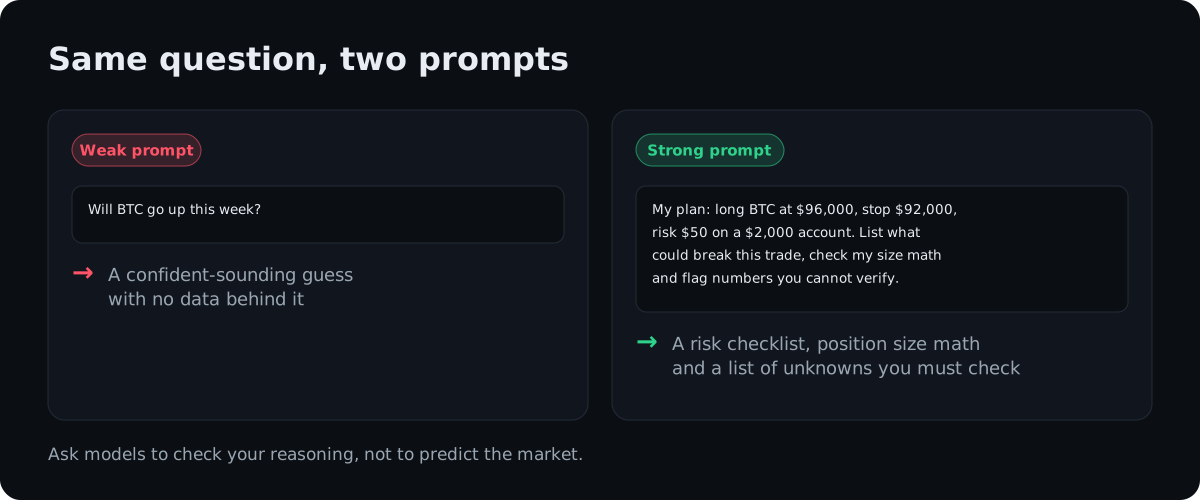
Most people open ChatGPT or Claude and type “will Bitcoin go up?” The answer sounds smart and is worth nothing, because the model has no special view of the future. Ask the same model to check your trade plan against your own numbers and it becomes useful: it catches math errors, lists risks you skipped and finds patterns in your history.
Below are 16 prompts we use, grouped by job. Copy them, replace the numbers in brackets with yours, and they work in ChatGPT, Claude or any similar assistant.
Not financial advice. AI models make mistakes, including with numbers. Check every figure that matters, and keep the trading decisions to yourself. Crypto trading carries a high risk of loss.
How to write a prompt that works
A useful trading prompt has five parts: a role, your data, a task, limits and an output format. The limits are the part most people skip, and they matter most, because they stop the model from filling gaps with invented prices.
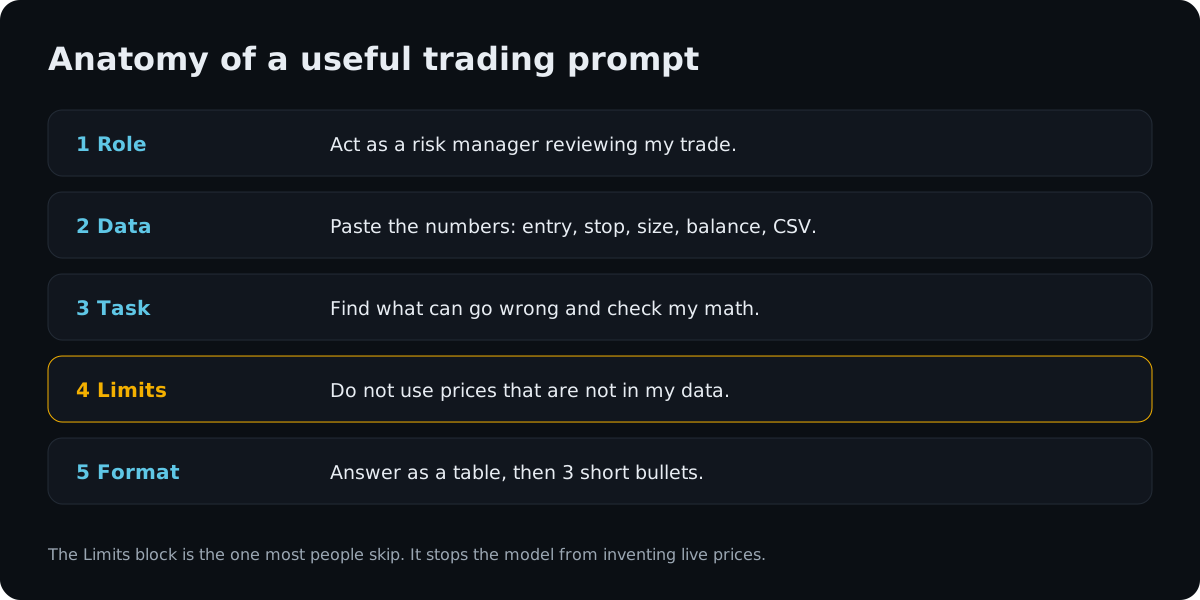
Two habits make every prompt below better. Paste the numbers you want the model to use instead of letting it look them up. And ask it to say which of its statements it cannot verify.
Before a trade
1. Trade plan review
Act as a strict risk manager. My plan: [long/short] [coin] at [entry],
stop at [stop], target [target], account size [balance], risk per trade [amount].
List everything that could make this trade fail, check whether my stop and target
make sense relative to each other, and point out any number you cannot verify
from my message. Do not use prices that are not in this message.
2. Position size calculator
My account is [balance] USDT. I risk [1]% per trade. Entry [entry], stop [stop],
leverage [x]. Calculate the position size in coins and in USDT, the margin needed,
and the approximate liquidation price for an isolated position. Show the formula
for each step so I can check it.
Check the liquidation price against your exchange’s own calculator. Exchanges use different maintenance margin tiers, which our guide to leverage in crypto futures explains.
3. Pre-trade checklist
Turn these rules into a short yes/no checklist I can run before every trade:
[paste your rules, e.g. "only trade with the trend on 4h", "no trades before CPI"].
Add three questions that check my emotional state.
4. Devil’s advocate
I want to buy [coin] because [your reasons]. Argue the opposite case as strongly
as you can, using only the facts I gave you and general market knowledge.
Then tell me which of my reasons is the weakest.
Research
5. Summarize project documents
Below is the documentation of [project]. Summarize in 10 bullet points:
what the product does, who uses it, how the token is used, total and circulating
supply, upcoming unlocks, and the biggest risks the document mentions or avoids.
Quote the sentence your answer is based on for every number.
Asking for a quote per number makes it easy to spot a figure the model invented.
6. Token unlock check
Here is the vesting schedule of [token]: [paste table]. Current circulating supply
is [number]. Calculate how much new supply unlocks in each of the next 6 months
as a percentage of current circulating supply, and flag the months above 5%.
7. Compare two projects
Compare [project A] and [project B] in a table using the data I paste below:
[paste data]. Columns: what it does, revenue or fees, token supply, unlocks,
main risk. If a cell has no data in my message, write "not provided".
8. Read an exchange or governance announcement
Here is an announcement: [paste]. What exactly changes, from what date,
who is affected, and what do I need to do, if anything? List any deadline separately.
This prompt is handy for token migrations, delistings and airdrop claims, where missing a date costs money. Our Fables token launch guide is a recent example of a launch with several deadlines.
After the trade: journal review
Most exchanges let you export your trade history as a file. Remove account IDs and other personal columns before you upload it.
9. Find your losing patterns
Attached is my trade history (CSV). Find patterns in my losing trades:
time of day, day of week, holding time, leverage, coin, and whether the trade
came right after another loss. Show the numbers behind each pattern.
10. Rule check
My rules are: [paste rules]. Go through the attached trades and list every trade
that broke a rule, which rule it broke, and the result of that trade.
11. Monthly report
Using the attached trades for [month], give me: number of trades, win rate,
average win, average loss, largest loss, profit factor, and total fees paid.
Then write three short sentences on what changed compared with the previous month:
[paste last month's numbers].
Learning
12. Explain with my numbers
Explain how [funding rates / liquidation / impermanent loss] works using
this example: [your numbers]. Then give me three questions to check I understood,
and wait for my answers before explaining the solutions.
13. Translate jargon
Explain this message in plain words, as if I started trading last month: [paste].
List any terms I should look up.
Code and tools
14. Draft a simple backtest
Write a Python script that backtests this rule on a CSV of daily candles
(columns: date, open, high, low, close, volume): [describe rule].
Include fees of [0.1]% per trade, avoid look-ahead bias, and print total return,
max drawdown and number of trades. Explain each block of code.
Treat the result as a draft. Run it on data you trust, and remember that a good backtest says little about the future.
15. Spreadsheet formulas
I track trades in a spreadsheet with columns: date, coin, side, entry, exit,
size, fees. Write formulas for profit per trade, running balance and win rate.
Tell me which cells to put them in.
Safety
16. Scam check
I received this message: [paste text or describe the site]. List the warning
signs of a scam in it, explain what would happen if I followed its instructions,
and tell me how to verify it through official channels.
A model is a decent second pair of eyes for phishing messages, fake airdrops and “support agents” in direct messages. It cannot confirm that a link is safe, so never connect a wallet because a chatbot said a site looks fine.
What not to ask
Some prompts waste your time or put your money at risk:
- “Which coin will 10x?” or “where will BTC be next week?” The model will guess, and the guess will sound sure.
- Anything that involves your API keys, passwords or seed phrase. Never paste them into a chat.
- “Write me a bot and connect it to my account.” Automated trading with code you do not understand is how small mistakes become large losses. Our article on trading crypto with AI covers what happened when AI models traded real money on their own.
ChatGPT or Claude?
For these tasks, both work. Each can read pasted text and uploaded files, write and explain code, and follow detailed instructions. Paid plans of the big assistants cost about 20 dollars a month, and the free tiers handle most single prompts. The prompt matters more than the model: a clear role, your own data and firm limits.
If your trades sit on one exchange, its built-in AI can cover part of this without any export. We reviewed those tools in our BingX AI guide, and you can open a BingX account here (referral link). For analysis across several exchanges and wallets, see our comparison of AI crypto portfolio trackers. This content is for information only and is not financial advice.
Frequently asked questions
What are the best ChatGPT prompts for crypto trading?
The prompts that work best ask the model to check your thinking with your own data: review a trade plan, recalculate position size, summarize a project's documents, or find patterns in your exported trade history. Prompts that ask it to predict prices give confident guesses with nothing behind them.
Is ChatGPT or Claude better for crypto traders?
For the tasks in this guide, both work well, and the quality of the prompt matters more than the choice of model. Use the one you already pay for or prefer. Whichever you use, check any number the model states that did not come from your own data.
Can ChatGPT or Claude see live crypto prices?
Not by default. Some plans can search the web, but a chat model may still give an outdated or wrong price in a confident tone. Paste the prices you want it to use, and tell it not to use any price that is not in your message.
Is it safe to share my trading data with an AI chatbot?
Share only what the task needs. Remove account IDs, emails, wallet addresses and anything that identifies you before uploading a file. Never paste API keys, passwords or seed phrases into any chat.
Can AI prompts make my trading profitable?
No prompt creates an edge by itself. Good prompts help you catch mistakes, size positions correctly and learn from your history, which removes some common ways traders lose money. This content is for information only and is not financial advice.
#AI#ChatGPT#Claude#prompts#trading journal#risk#DYOR
Discussion
Loading comments…